


Product details
How it works
The device remembers your Start / Stop preference between drives. Use the factory Start / Stop button to change your selection.
Check your fitment
- 2025–2026 Ram 1500, including eTorque.
- Select 2WD or 4WD to match your truck. Each drivetrain uses a different harness.
Installation
Choose the harness for your drivetrain: 2WD uses gray connectors; 4WD uses blue connectors. The harnesses are not interchangeable.
4WD installation | 2WD installation
Turn the vehicle off before beginning. Open the passenger door and allow at least three minutes for the vehicle electronics to go to sleep before unplugging a connector; avoid operating buttons or opening and closing doors during that time.
4WD installation — blue connectors
Tool: 10 mm socket or wrench. Watch our 4WD installation video. The video and illustration in this section show the 4WD connection.
- Open the access area. Remove the jack access cover beneath the passenger front seat. Lift at the front PULL edge, then release the rear hooks.
- Remove the passenger door-sill trim. Begin at the rear and release the clips working forward. Pull the trim rearward to release the two front clips.
- Identify the correct connector. In the passenger kick-panel area, locate the upper blue connector at the bottom of the large black module, shown below. Do not use the lower hanging blue connector with the pink lock.
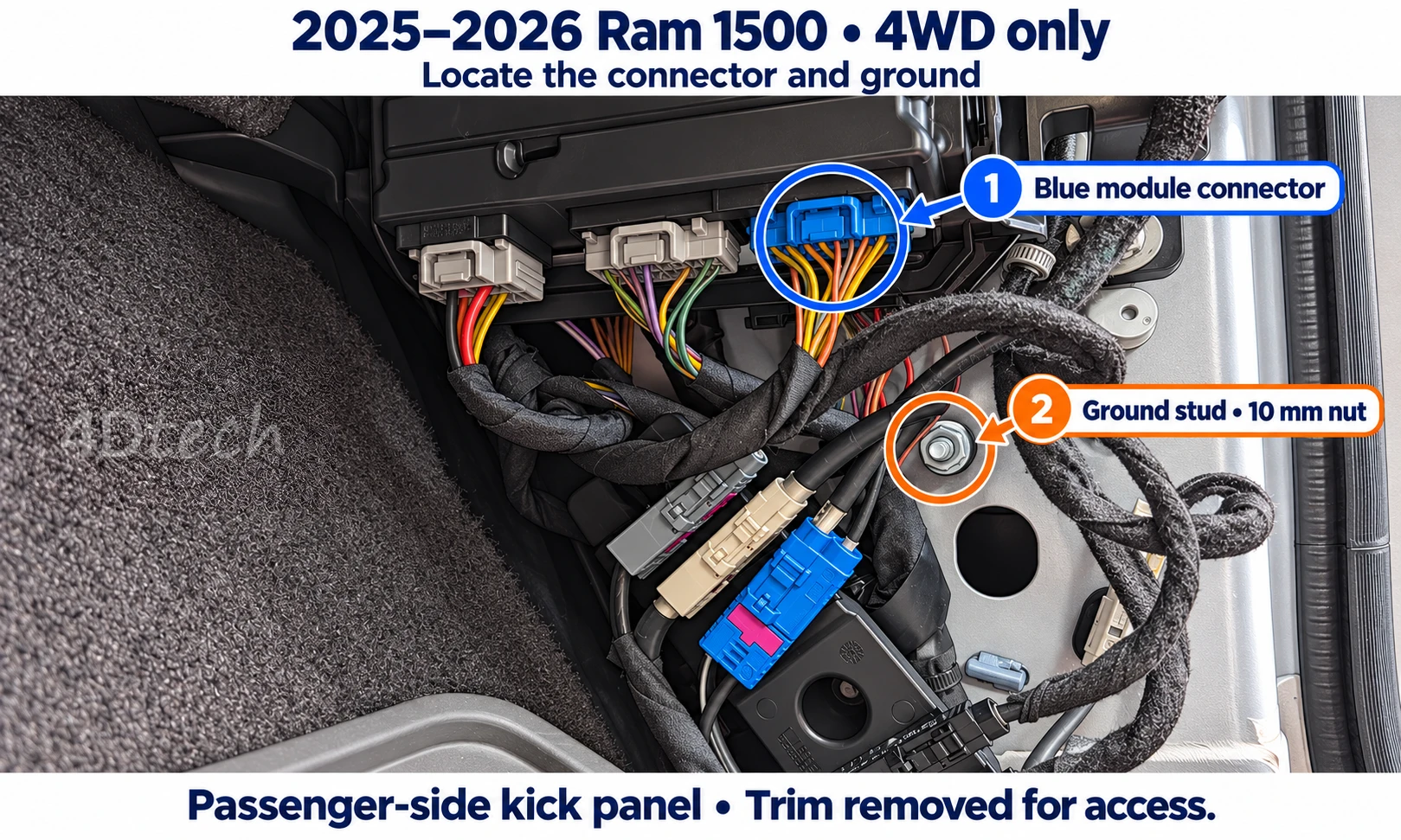
- Connect the ground lead. Remove the nearby 10 mm ground nut shown in the illustration, place the harness ring terminal over the stud, then reinstall and securely tighten the nut.
- Plug the harness inline. Push the factory connector inward slightly, firmly press its release tab, then pull on the connector body to disconnect it. Do not pull on the wires. Connect the factory plug to the matching end of the Eliminator harness and plug the other end into the module. Fully seat both connections.
- Reassemble. Position the device and wiring clear of trim clips and moving parts. Refit the two front sill-trim clips first, then the remaining clips. Reinstall the jack cover with its rear hooks first.
2WD installation — gray connectors
The 2WD version connects in the passenger footwell/kick-panel area using its gray-connector harness. Use the 2WD connection, not the blue connector shown in the 4WD illustration.
- Access the passenger kick-panel area. Release the passenger-side sill/access trim to reach the module connections.
- Match the gray connector. Locate the factory connector that matches the 2WD harness. Push the connector inward slightly, press its release tab firmly and disconnect it by pulling on the connector body, not the wires. Never force a connector that does not match.
- Install inline and connect ground. Plug the factory connector into the matching harness end and the other end into the original module connection. Secure the harness ring terminal at the factory ground point and fully seat both connectors.
- Reassemble and check operation. Keep the device and wiring clear of trim clips and moving parts, then reinstall the trim.
Dedicated 2WD installation photos are being prepared. If you need help identifying the connection or ground point, contact our support team before disconnecting anything.
After installation: use the factory Start / Stop button to select ON or OFF. The device remembers your preference between drives. Factory remote start continues to work.
A paper quick-start guide is included. For help with your installation, contact our support team.
Designed by 4D Tech.
Supported by 4D Tech.
We design the circuit board, firmware and wiring harness for our Start / Stop Eliminators. Your purchase includes installation guidance and support directly from the designers.
Designed and supported in the USA. Meet 4D Tech.