Your vehicle. Better to drive.Help Center U.S. technical support

SYNC 3 GPS antenna connector orientation
Help Center

SYNC 3 GPS antenna connector orientation

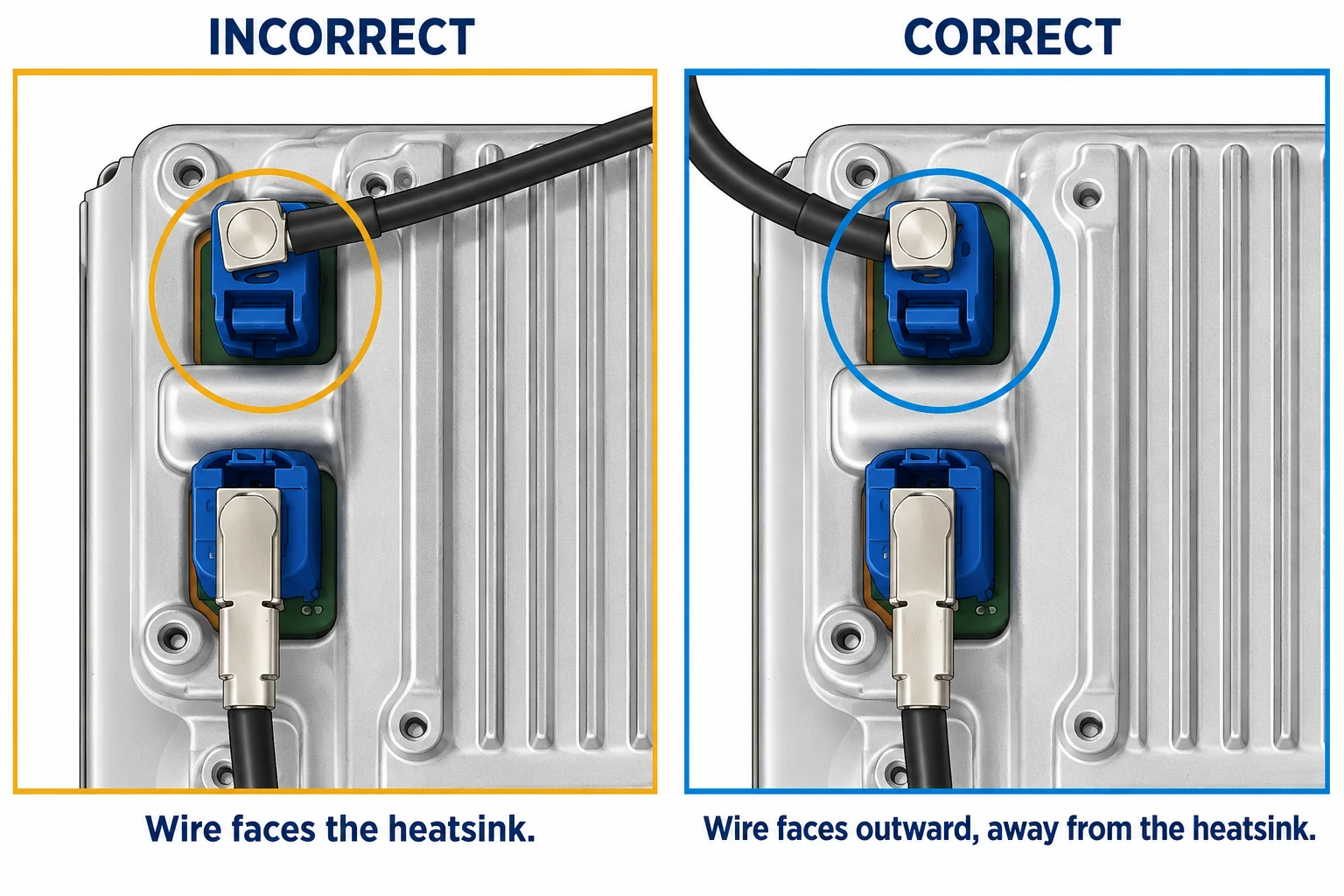
The GPS antenna connector’s angled wire exit must face away from the module’s heatsink. If the wire hits the heatsink, it can prevent the blue connector from seating fully.

Incorrect: GPS antenna wire exits toward the heatsink. Correct: wire exits outward, away from the heatsink, allowing the connector to seat fully.
Keep the angled wire exit clear of the heatsink. Select the illustration to enlarge.

Check the connection

  1. Follow your kit’s installation instructions to access the GPS connector.
  2. Swivel the angled wire exit outward, away from the heatsink, as shown in the correct photo.
  3. Seat the blue connector fully until it clicks into place.

The retention clip’s direction varies by SYNC 3 module: it may face down as pictured or toward the heatsink. Use wire clearance and full seating as your checks, rather than expecting every clip to face the same way.

If the connector will not seat or your hardware differs, contact us with a clear photo and your kit details.