


Product details
How it works
The 4D Tech Start / Stop Eliminator initially turns Auto Start / Stop OFF. Leave it there, or use your factory button to turn it ON. The device remembers either selection and restores it the next time you start your F-150.
Your factory button continues to work normally. Turn Start / Stop ON or OFF whenever you want; the device remembers either selection. Remote start continues to work.
Check your fitment
Fits the F-150 model years shown in the Fits section above, including Raptor. Works with either factory button location: above the touchscreen or to the left of the steering wheel, above the headlight switch.
Not compatible with PowerBoost™ Hybrid models.
Install behind the lower glovebox
No tools, wire cutting or programming are required. Watch the vehicle-specific installation video on this page before you begin.
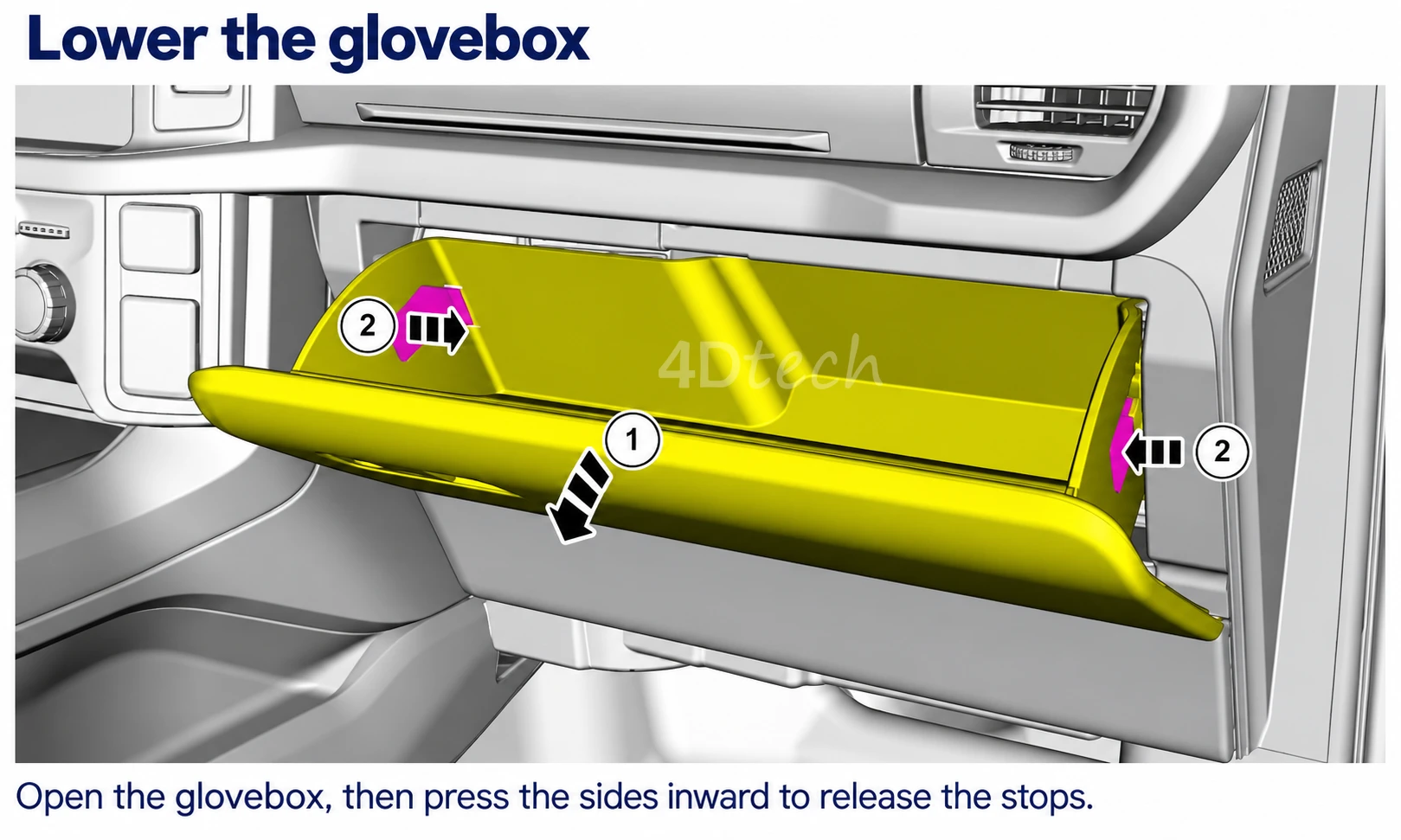
- Open the lower glovebox, press both sides inward to release the stops, then lower it. As shown in the video, the glovebox can be unsnapped from its hinges and set aside for access.
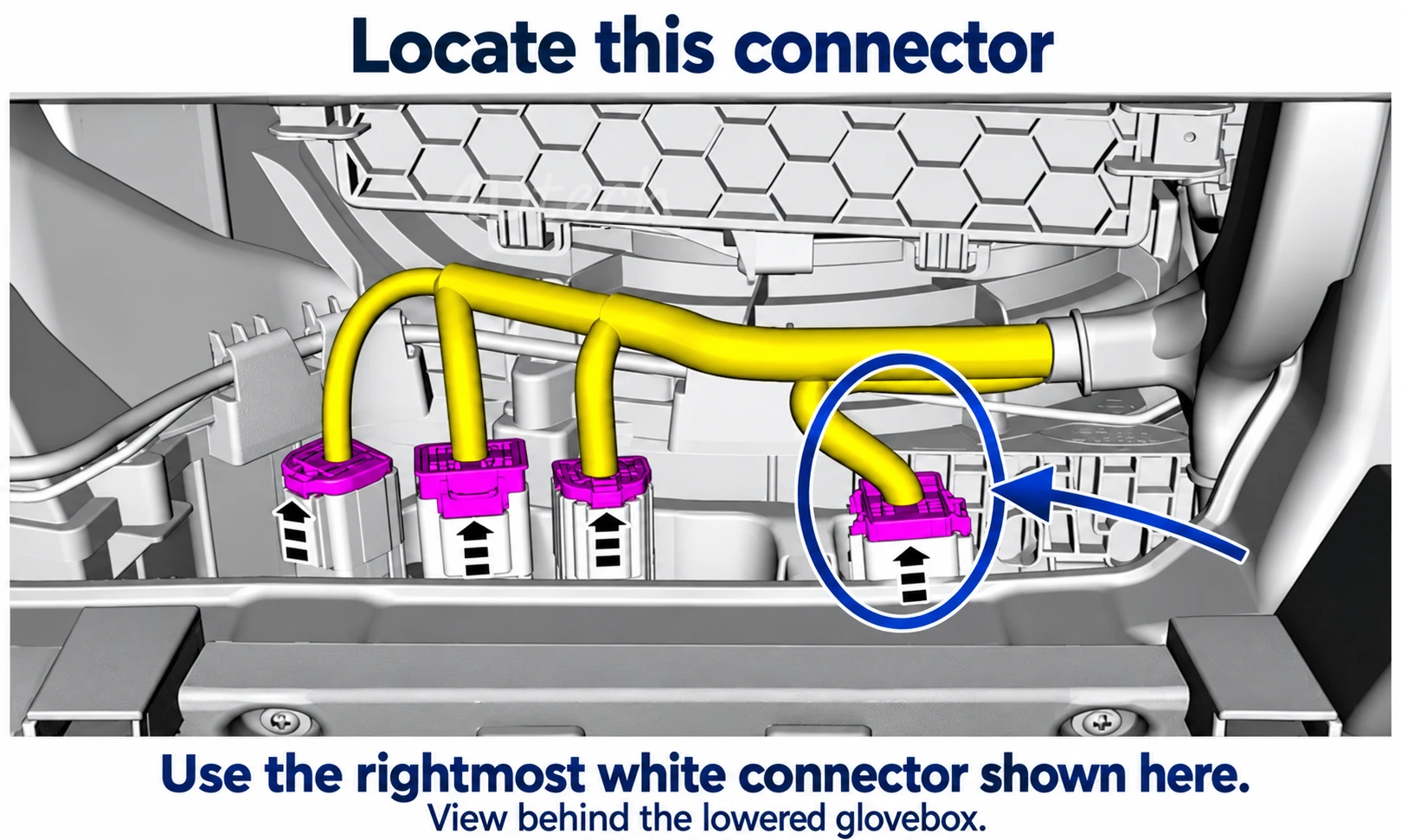
- Locate the rightmost white connector in the bank of four shown in the diagram. Press its release tab, which faces toward the driver's side, and unplug it.
- Connect the Start / Stop Eliminator inline between the factory connector and its original connection point. Push both connections fully into place until each audibly clicks.
- Tuck the device and wiring out of the glovebox's path. Refit the glovebox on its three hinges and close it, checking that the wiring does not interfere.
Use the diagrams to identify the location and the video to see the complete connection procedure. Diagram colors are highlights; identify the connector by position, not color alone.
The same installation connection is used across all supported F-150 versions, including Raptor.
A paper quick-start guide is also included. If you need help, contact our support team.
Designed by 4D Tech.
Supported by 4D Tech.
We design the circuit board, firmware and wiring harness for our Start / Stop Eliminators. Your purchase includes vehicle-specific installation guidance and support directly from the designers.
Designed and supported in the USA. Meet 4D Tech.
Warranty information
One year from date of purchase247 Reviews Hide Reviews Show Reviews
-
Auto start/stop eliminator
This auto start stop. Eliminator works great. Easy install and works great.
-
F150 S/S Eliminator
Super easy to install. You can do it from sitting upright in passenger seat. No more having to remember to hit the button after you realize the engine shut off at a stop again!
-
Start Stop Eliminator
Very Easy install - works great!
-
Start / Stop Eliminator -2023 F150
Worked perfect and super easy to install by simply removing the glovebox. Very very easy. This easy installation was the deciding factor for me.
-
2023 f-150 Raptor…It works!
I searched the internet for a good auto start/stop eliminator and I found a few that required me to basically remove the button cluster above the infotainment system. I did not want to do that, if not required. I came across this product which only requires you to remove the bottom glove box which is way less likely to break/scratch something so I ordered it. To my surprise it works exactly as advertised. It memorizes the last setting you had it on and does not throw any codes or mess anything else up. Everything works completely fine. I would buy again, and glad I made the purchase.
-
Start/Stop Eliminator
Took less that 5 minutes to install, works as advertised!!
-
Auto start/stop eliminator
Works perfectly, installed in less than 5 minutes. I’m very pleased with the result.
-
I have installed the unit, it works great just like in your video. Thank you for coming up with a great device.
I have installed the unit, it works great just like in your video. Thank you for coming up with a great device.
-
Fantastic Product/Super Easy To Install
I think the auto stop feature on my truck is ridiculous. I hated having to remember to push the override button every time I started it. Upon startup, this product remembers what mode the truck was in the last time it ran and that's the mode it stays in unless you change it. Installation took less than five minutes and no tools are needed.

