


Product details
Your preferred setting, every drive
The 4D Tech Start / Stop Eliminator remembers your Auto Start / Stop setting and restores it when you start your Explorer. Choose OFF to keep the engine running at stops, or choose ON to use the factory system. Your factory button continues to work normally, and remote start is retained.
Check your fitment
Fits 2025–2027 Ford Explorer, all trim levels, with or without the factory wireless charger. For a 2020–2024 Explorer, use our separate 2020–2024 listing.
Installation in the passenger footwell
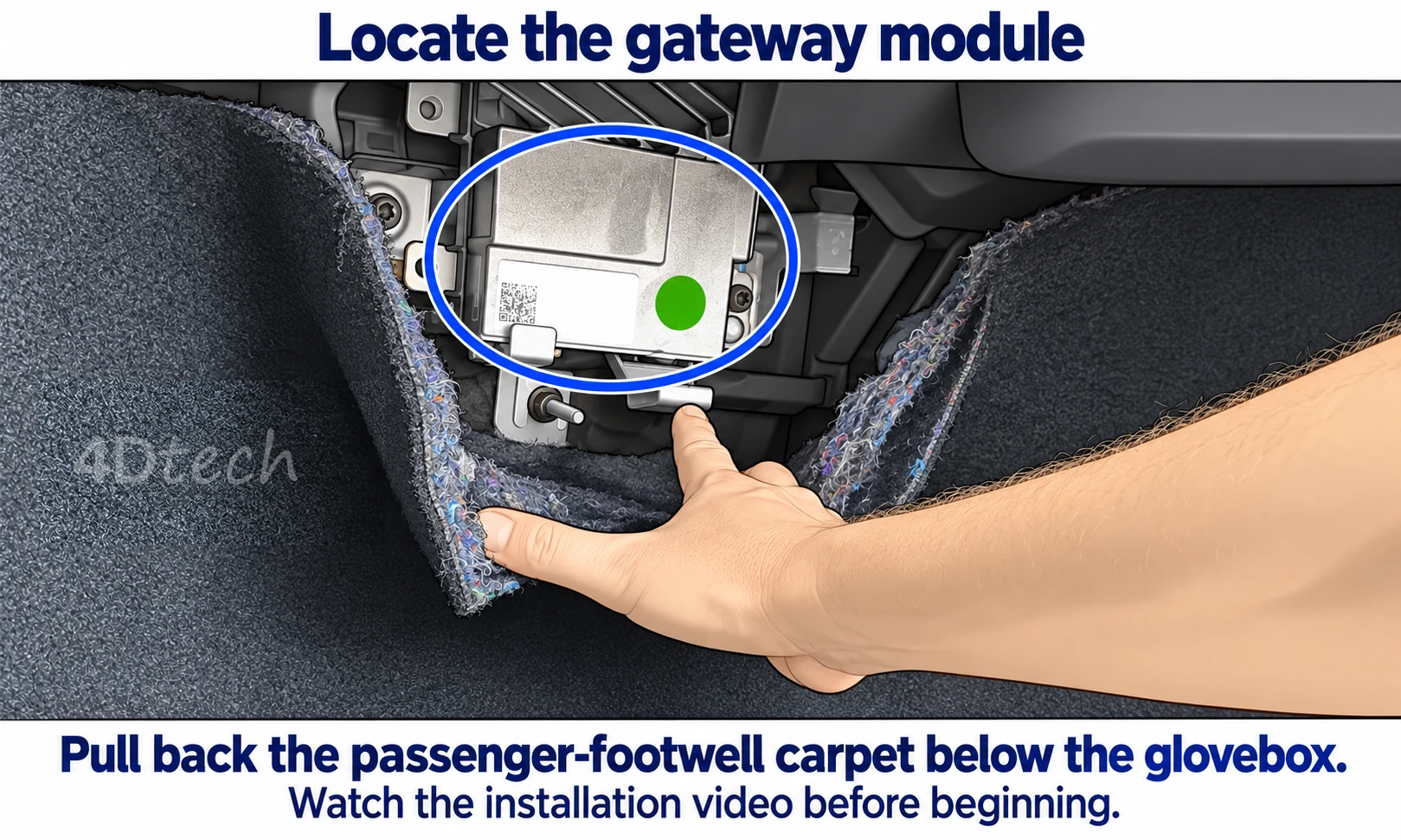
The device connects inline at the gateway module below the glovebox, near the upper edge of the passenger-footwell carpet. No tools are required for the procedure shown in our video.
Watch the complete installation video before beginning.
- Expose the connection. Locate the metal gateway module peeking above the carpet and carefully pull the carpet down, as shown in the video.
- Move the protective bracket. Move the metal connector guard down only as shown to reach the connector. Take care around its sharp edges.
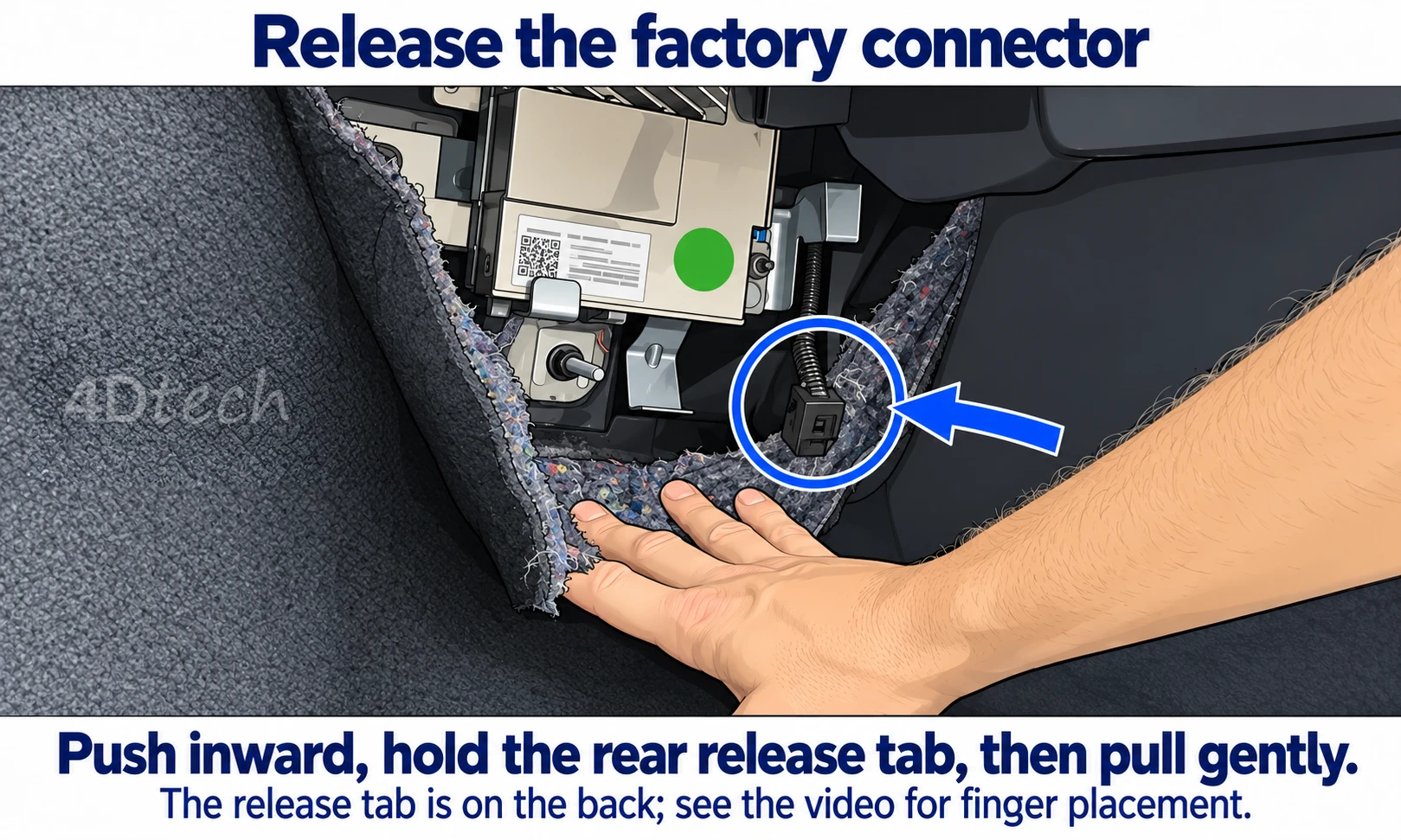
- Release the factory connector. The release tab is on the back of the connector, in the middle. Push the connector inward first, firmly press and hold the release tab, then pull the connector out gently. Do not pull on the wires.
- Connect the device inline. Plug the factory connector into the Start / Stop Eliminator, then connect the other end to the gateway module. Seat the connections firmly until they click.
- Secure and finish. Return the protective bracket to position. Tuck the device and wiring out of the way, using the included zip tie as shown, and put the carpet back in place. Start the vehicle and use the factory button to select your preferred setting.
Jump to the connector-release demonstration. If the connector will not release, stop and contact our support team.
A paper quick-start guide is included.
Designed by 4D Tech.
Supported by 4D Tech.
We design the circuit board, firmware and wiring harness for our Start / Stop Eliminators. Your purchase includes vehicle-specific installation guidance and support directly from the designers.
Designed and supported in the USA. Meet 4D Tech.
Warranty information
One year from date of purchase60 Reviews Hide Reviews Show Reviews
-
Finally fixed that dumb button!
Love this piece!! Was not quite as easy to put on as the guy in the video doing it. But it was just a matter of getting ahold of it. Love, love that it turns that stupid button off permanently until you want it on. Also, great that it does not affect your warranty in hooking it up. That was a huge factor in buying this one. Along with not having to take the mag safe area apart like with others that are sold. Buy it NOW. You won’t regret it
-
stop start, installation
Super easy to install. Works perfect, 2026 ford explorer ST.
-
Inconceivable
I can’t give this a good review because I’m afraid I’ll jinx it. The S/S Eliminator is too good to be real. Install was easy, I would purchase again.
-
Explorer (25-26') Start / Stop Eliminator
Works GREAT, love this item
-
Start Stop Eliminator
Simple installation, works as advertised.
-
Start / Stop Eliminator 26 Explorer ST
I have 3 Fords all running the 4D Tech Start / Stop Eliminator. I just acquired the 26 Explorer, this was the easiest installation I’ve done. I go through a lot of vehicles and I use 4D Tech product exclusively, they always work as advertised, never a failure! Service is also great, product arrives promptly after order. Highly recommended!
-
Start/stop eliminator for ‘26 Explorer ST
Thank you for this! I got my new Explorer ST a few weeks ago and it was driving me crazy, shutting down pretty much every time I came to a stop. The Eliminator took 5 minutes to install and it works perfectly! Plus it saves my motor, starter and battery from costly repairs or replacement later on.
-
Awesome Product
Extremely easy to install and works as described. On quality.. if I didn't know I installed it - the wiring, connectors, wire covering, etc look OEM quality or better. They are also fast on emails if you have questions - so customer service is also good. This is my second S/S Eliminator from them. Worked on my previous Hyundai for over a year - without issue.. in gulf coast heat. (still working; whoever bought it used has it now)
-
Love it!
Super easy to install - my last vehicle required removing the center console.. this took seconds on the Explorer. I was sad to hear software based solutions were unable shut down auto stop/start on a 2025 - BUT.. even if it could - with this button pushing mimic harness, no worries about "is my Battery Management System (BMS) still running?". Customer support is awesome. Feedback was measured in hours (if that) vs days when I had questions/etc.